
Is It Safe to Merge PDFs Online? (PDF Privacy)
Find out if merging PDFs online is safe. Learn about the privacy risks of server-side tools and how client-side processing protects your documents.
When you need to combine multiple PDF files into one document, the first instinct is often to search for a free online tool. But is it actually safe to merge PDFs online?
The short answer: It depends entirely on which tool you use.
The Problem with Most Online PDF Tools
Most "free" PDF merging websites work by uploading your files to their servers. Here's what actually happens when you use them:
- You select your PDF files
- Your files travel across the internet to a remote server
- A computer you don't control processes your documents
- You download the result
During this process, your files exist on someone else's infrastructure. This creates real privacy and security concerns.
What Can Go Wrong?
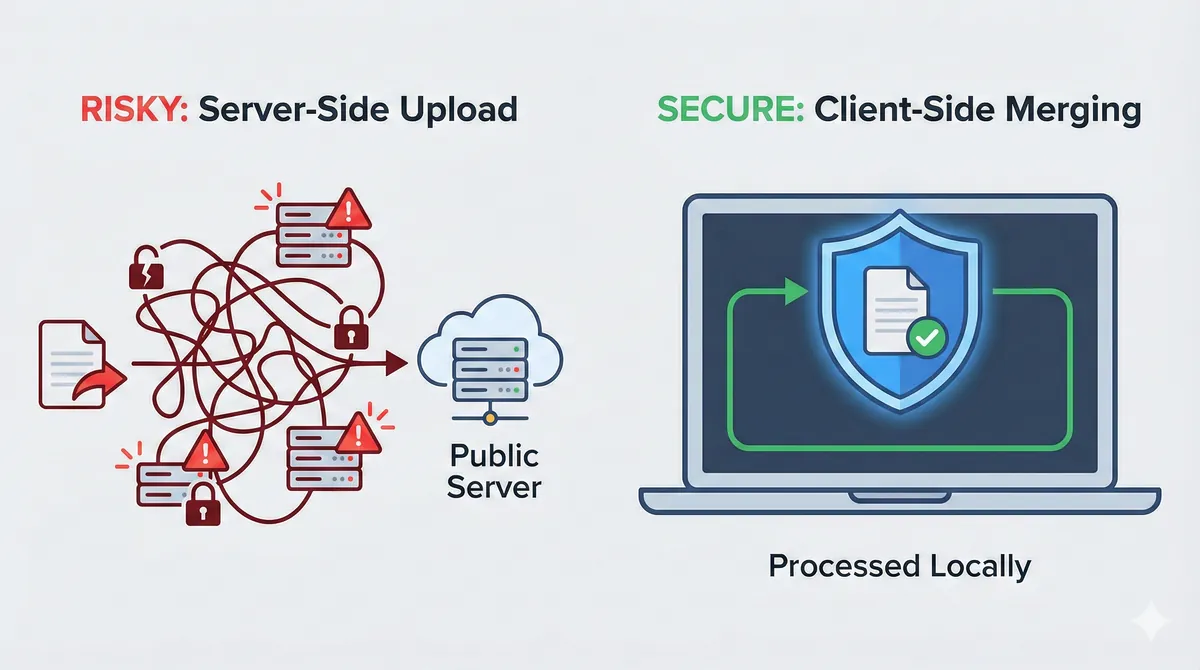
Your Files Exist on Unknown Servers
Even if a service claims to "delete files after 1 hour," during that window:
- Server administrators could access your documents
- A data breach could expose your files
- Your data could be logged, analyzed, or retained
Data in Transit Can Be Intercepted
When files travel across the internet, they pass through multiple network points. On unsecured connections (public WiFi, for example), this creates vulnerability to interception.
Privacy Policies May Permit Data Use
Many free tools have vague terms of service. Some explicitly allow:
- Using your data for "service improvement"
- Analyzing document content
- Sharing anonymized data with partners
When Server-Side Tools Are Especially Risky
You should be particularly careful with:
- Legal documents NDAs, contracts, agreements
- Financial records Tax returns, bank statements
- Medical information Health records, patient data
- Personal identity documents IDs, passports
- Business-sensitive files Proposals, internal memos
For professionals in law, healthcare, or finance, uploading client data to unknown servers could violate compliance requirements like GDPR or HIPAA.
How to Know If a Tool Is Safe
Before using any online PDF tool, ask:
| Question | Safe Answer |
|---|---|
| Does it upload files to a server? | ❌ No |
| Is processing done in my browser? | ✅ Yes |
| Do files leave my device? | ❌ No |
| Does it require an account? | Ideally ❌ No |
| Is privacy policy clear? | ✅ Yes |
The Safe Alternative: Client-Side Processing
Some modern PDF tools use a technology called client-side processing. This means:
- All processing happens inside your web browser
- Your files never leave your device
- No upload, no server storage, no risk
- Works even if you disconnect from the internet
This approach gives you the convenience of an online tool with the security of desktop software.
What Should You Do?
If you need to merge PDFs and care about privacy:
- Avoid generic "free PDF merge" tools most upload your data
- Look for client-side processing your files stay local
- Check privacy policies if vague, don't use it
- Consider what's at stake personal files need protection too
For a completely private way to combine your documents, see our complete guide: How to Merge PDF Files Securely Without Uploading.
Related Reading
Written by the AeroPDF Team. Last updated: January 2026.
Ready to Try AeroPDF?
All our 22+ PDF tools are 100% free and work directly in your browser. Zero uploads, no signups — total privacy.